The Breakroom

Introducing Flare 1.2

August 16, 2011

By Webmaster

The latest update to Flare, our popular photo editing app for Mac OS X, is now available for download. Version 1.2 introduces external editing for seamless integration with iPhoto, Aperture, and Lightroom. Designate Flare as your external editor in one of those apps and you can jump into Flare to edit your photo, then return right to that app when you’re finished. Head on over to the Mac App Store to get Flare, then check out our guide to setting up Flare as an external editor. And don’t forget to post your photos to the ‘Made with Flare’ Flickr pool when you’re done editing!

Heroes & Villains Icons

August 16, 2011

By Webmaster

hulk_256

HULK SMASH BORING DESKTOPS! Iconfactory artist David Lanham brings some of pop culture’s most iconic heroes and villains to your desktop to duke it out. The Heroes and Villains collection features characters from both movies and comics drawn in David’s own unique style and is sure to liven up any Mac or Windows based PC. Jump into action and download Heroes and Villains today!

Twitterrific 4.3 for iOS & Mac Brings Timeline Syncing

August 9, 2011

By Webmaster

Announcing the release of Twitterrific 4.3 for iOS and Macintosh. This latest update to our popular Twitter app includes support for syncing reading position in the timeline across all platforms, improved scrolling in Lion, viewing Camera+ images inline and a host of additional improvements and bug fixes.

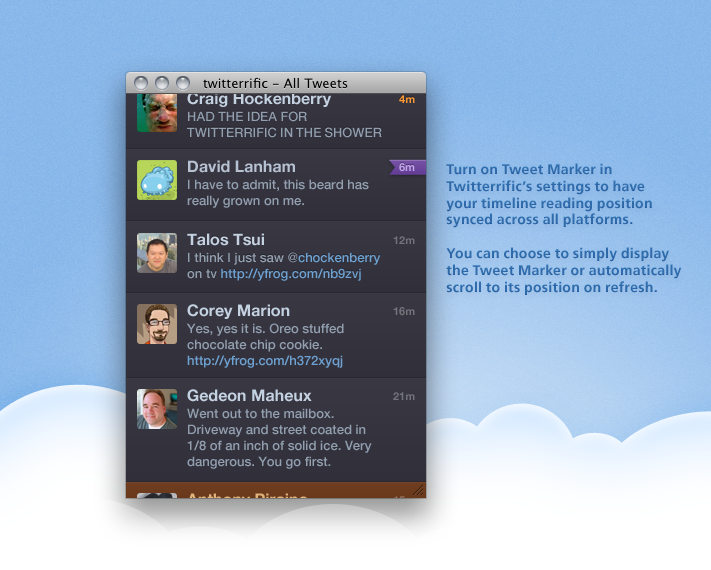
Version 4.3’s best feature is the ability to sync your reading position across all versions of Twitterrific by using the Tweet Marker API. Twitterrific keeps track of where you are in the timeline and displays that position as a bookmark on the tweet’s timestamp. Twitterrific can also automatically scroll to this position – no more searching for where you last left off. This makes reading your timeline a breeze when moving between Mac and iOS during the course of a day. Turn on timeline syncing via Twitterrific’s settings.

Some of the notable highlights in Twitterrific 4.3 include:

  • Syncing of timeline positions across all versions via Tweet Marker
  • Improved t.co and Twitter picture handling
  • Support for displaying Camera+ images inline
  • Support for normal tweet notifications with Growl (Mac)
  • Refinements to full screen mode & scrolling in Lion (Mac)
  • Improved handling of errors associated with incorrect time & time zones
  • Plus more – iOS / Mac

Twitterrific 4.3 is available as both a universal app for iPad, iPhone and iPod Touch, as well as for the Mac desktop via the iOS and Mac App Stores. The software is free of charge for use with a single Twitter account. Users can upgrade in-app to remove advertising and enable multiple Twitter accounts.

To help mark the release of version 4.3, we’re offering a special 50% discount for the Mac version of Twitterrific in the Mac App Store. If you’ve been on the wire about Twitterrific for Mac, now’s the time to take flight. Twitterrific is available from the Mac App Store for just $4.99 for a limited time.

We invite you to visit the Twitterrific website to view the complete list of what’s new for both iOS and Mac OS X, get answers to frequently asked questions and purchase Twitterrific related goodies and gear. Enjoy and have fun!


xScope 2.5 for Mac OS X Lion

July 14, 2011

By Webmaster

xScope_256

ARTIS Software and the Iconfactory have released an important update to our popular utility for measuring and comparing on-screen elements, xScope. Version 2.5 includes compatibility for Mac OS X 10.7 and is required in order to run the software on Lion.

We are also pleased to announce xScope is now available for purchase from the Mac App Store for $29.99. Ordering from the Mac App Store is quick, easy and means there are no registration codes to keep track of. In addition, new users who purchase xScope 2.5 from the Mac App Store or here from the Iconfactory, will receive a free upgrade to xScope v3.0 in the months ahead. If you’re a new user, this is a great time to take advantage of this special offer.

Designers and developers everywhere have discovered the time saving power of xScope for Mac OS X. Version 2.5 is a free update to existing registered users of 2.x and is available today via the xScope home page.

Take Five 1.1 Now Available

July 5, 2011

By Webmaster

TakeFive_256

We’re pleased to announce that version 1.1 of our handy music pausing utility Take Five has arrived for the Mac. This latest version adds the ability to pause music from the most popular Mac audio desktop programs including Ecoute, Pulsar, Radium, Rdio, and Spotify. The same elegant and easy to use interface that controlled iTunes now works with your favorite audio apps as well.

Take Five v1.1 is available now via the Mac App Store so head on over today. Ordering from the Mac App Store is quick, easy and means there are no registration codes to keep track of.

We invite you to visit the Take Five homepage for more information including screen shots and answers to some of your more frequently asked questions. Never again let a call from your Mom, lolcat videos or visits from your boss put your music on permanent pause. Your music can only wait so long!

Regarding Twitter’s OAuth Policy Change

June 22, 2011

By Webmaster

Twitter recently announced a new authentication policy that changes the way third party software like Twitterrific must interact with your account. Instead of entering your username and password directly into Twitterrific, users will now be required to authenticate through Twitter.com, which then authorizes the application to access their updates. Authenticating in this manner allows you to keep access to direct messages from within Twitterrific and in theory, makes your account more secure.

To continue using Twitterrific to access your tweets, please update to the latest version before June 30th, 2011. We’ve done extensive testing on Twitterrific using the new OAuth authentication process and have attempted to make it as bulletproof as possible for you. The recently released v 4.2 for iOS & Mac incorporates these changes and has already been downloaded seamlessly by thousands of users.

Any version of Twitterrific (for Mac or iOS) prior to 4.2 will not function properly after June 30, 2011. We’re sorry that this change in Twitter policy may cause confusion and frustration for some of our users.

Note: Using different versions at the same time will cause authentication errors so it is important to upgrade all devices and platforms.

Twitterrific 4.2 for iOS and Mac is a free upgrade for registered users of v3.x Universal for iOS and v4.x for Mac and is available for download from the iOS and Mac App Stores today. As always, we thank you for your support, patience and understanding in dealing with Twitter.com’s changes in policy.

“Ooooh, you’re a dreamboat… BILLY EVERYTEEN!”

June 21, 2011

By Webmaster

futurama7_256

Good news everyone! New episodes of everyone’s favorite cartoon from the year 3000, Futurama, start this week on Comedy Central. To help celebrate the new season, we’re pleased to announce the release of Futurama Vol. 7 from Gedeon Maheux.

This latest set in the ongoing series brings more of your favorite characters to life like Rev. Lionel Preacherbot, Morgan Proctor and QT McWhiskers. Grab a travel tube and shoot on over and download Futurama Vol. 7 for your Mac, or Windows desktop or as a handy, searchable CandyBar iContainer today. Oh my, yes!

Twitterrific 4.2 for iOS & Mac

June 15, 2011

By Webmaster

TwitterrificMac_256

Announcing the immediate release of Twitterrific 4.2 for iOS and Macintosh. This latest update to our popular Twitter app includes support for the popular Read It Later bookmarking service, improved tapping of links in the timeline and a host of bug fixes just to name a few.

This update also incorporates the recently announced OAuth authentication policy change at Twitter. What does this mean for Twitterrific users? It simply means that after installing v 4.2 users will be required to re-authorize all of their Twitter accounts using the new login method.

The Twitterrific 4.2 update is free and recommended for all users.

Some of the notable highlights in Twitterrific 4.2 include:

  • Migrated from xAuth to OAuth logins to comply with Twitter’s recent authentication policy change
  • Read It Later
  • Support for the MLKSHK & Pikchur uploading services via settings
  • Right-click on a saved search to delete it (Mac)
  • Links in the timeline are now easier to tap (iOS)
  • Option in Settings to control frequency of auto-refresh rate (iOS)
  • Fixed a bug that prevented sidebar items from updating
  • Plus lots more – iOS / Mac

Twitterrific 4.2 is available as both a universal app for iPad, iPhone and iPod Touch, as well as for the Mac desktop via the iOS and Mac App Stores. The software is free of charge for use with a single Twitter account. Users can upgrade in-app to remove advertising and enable multiple Twitter accounts.

We invite you to visit the Twitterrific website to view the complete list of what’s new for both iOS and Mac OS X, get answers to frequently asked questions and purchase Twitterrific related goodies and gear. Enjoy and have fun!

Flare 1.1 – Now With More Everything!

June 8, 2011

By Webmaster

Flare was already an incredibly powerful and flexible photo editing app. Now version 1.1 adds even more options to your digital darkroom.

Flare 1.1 adds six brand new presets, including “Daguerreotype”, a preset based on one of the very first photographic processes from the 1800s. We’ve also added a slew of new effects to Flare. Use these new borders, lightleaks, and more to build your own presets and add just the right touch to your photos. Head to the Flare blog to learn more about the new effects and presets in 1.1.

Even better, to help celebrate the release of v1.1, we’re offering Flare at a special discounted price of just $9.99 for a limited time from the Mac App Store. Users can also download and try the application free of charge from FlareApp.com. We invite you to see how easy and beautiful this digital darkroom app really is. Your photos really are just the beginning.

Flare 1.0.2 Arrives

May 13, 2011

By Webmaster

Announcing Flare 1.0.2 for Mac OS X. This latest update allows you to move the location of the Flare Preset folder to anywhere on your hard drive, including a Dropbox volume. This means you can now quickly and easily share a single set of Presets across multiple Macs running Flare. Here are some of the notable highlights in version 1.0.2:

  • Location of Preset folder is now user customizable via Preferences
  • Command-Click on disclosure triangle to toggle all effects open/closed
  • Improves rendering speed of Presets and Snapshot panes
  • Auto-orientaion of images with EXIF rotation information on import

Flare 1.0.2 is available from the Mac App Store for $19.99. Users can also download and try the application free of charge from FlareApp.com. We invite you to see how easy and beautiful this digital darkroom app really is. Your photos are just the beginning.