The Breakroom

Wii Safety: The Missing Pages

December 5, 2006

By Webmaster

Preview

If you have not read or seen the recent hilarious posting by Kotaku about Nintendo’s Safety Manual from Japan, go take a look. Once you do, this entire post will make much more sense.

Thanks to one of our clients in Japan, who just happens to work for one of the printing companies Nintendo regularly uses, we are pleased to be able to bring you scans of some of the missing diagrams from the Wii Safety Manual. These helpful instructions somehow got cut from the final, shipping version but are no less important when it comes to proper handling of the Wii. Head on over to our Flickr page to check them out, but be prepared, the Japanese have a strange sense of humor.

UPDATE: Okay, we cannot tell a lie. We made it all up! But can you blame us really? It was begging to be done. :-)

UPDATE 2: Be sure to grab the ultra swanky Wii Safety desktop pictures in two amazing colors (teal and ecru) for your computer desktop!

Digg It!

The Ghost of Christmas Icons Past

December 3, 2006

By Webmaster

With December 25th fast approaching, we know you’ve been looking high and low for some festive holiday icons to help put you and your desktop in the mood. Perhaps you long for that one, perfect Christmas desktop picture that will finally get those sugar plums dancing at night. You are in luck because we’ve been serving up fun holiday treats year after year and the stash is sure to bring a smile to even the Grinch’s face.

A generic search for Christmas related entries reveals many items that you might find of interest. Among them are some of our favorite icon sets including A Christmas Story from Anthony, World of Aqua Christmas from Dave and Frosty the Snowman from Mindy. Desktop pictures more your cup of egg nog? No problem! Check out Ged’s Alpine set or Mindy’s fun Rudy and Criscow picts.

Users of our popular iPulse system monitoring utility will find several holiday jackets just waiting to decorate their desktops including Snowflake from Talos and Star from Corey. Who says system stats have to be cold and calculating?

Whatever your fancy this December we’re willing to bet we’ve got something in our stocking that will light a smile on your face and get you decking the halls. You just have to look. Have fun!

Renaissance Finance Released

November 30, 2006

By Webmaster

Stockicons.com has released the latest collection in the popular Renaissance family of royalty-free stock icons. Renaissance Finance extends the original collection into the realm of finance and commerce with icons covering concepts such as transactions, credit, interest, and more. We are also pleased to release this new collection as scalable EPS files for use in large format, print and web applications. Renaissance Finance is available today for $179 and Finance EPS is available for $129.

Open the Window

November 28, 2006

By Webmaster

Preview

Our freeware icon set release this week is a simple set of all-purpose icons that will come in handy for Mac and Windows users alike. This set of Every Day icons covers typical desktop categories like music, pictures, travel and more and has been rendered in the popular and energetic style of our Xpressionism stock icon family. Perfect for use on the desktop, we encourge you to download and check it out!

Gobble! Gobble!

November 22, 2006

By Webmaster

The Iconfactory is closing up for the U.S. Thanksgiving holiday and will be back to our normal pixel-pushing routine this coming Monday, the 27th. Online orders and support will of course continue so feel free to order that copy of Pixadex you’ve always wanted. It makes a great stocking stuffer!

We wish everyone on the road or in the skies, a safe journey to your destination this week. Enjoy the time away from work with friends and family and eat some yummy turkey for us while you’re at it! Happy Thanksgiving everyone!

All That and a Bag of Chips

November 21, 2006

By Webmaster

Preview

You may remember back in October when David and Ged risked frostbite and frozen fannies to pre-order their Nintendo Wiis from our local GameStop. Some may have called us crazy back then, but now that we have our consoles, we can tell you first hand that it was well worth it!

Much has been written about Nintendo’s new revolutionary game controllers and how they would “change the face of gaming forever”. Well, we’re here to tell you, that just about sums it up. Using the Wiimote to interact with the game isn’t just new and exciting, its satisfying. Striking a ball in Wii Sports Tennis almost gives you goose bumps. You hear the ball strike the racket, you feel the controller vibrate, and because you are actually swinging your arm to hit the ball, you feel like you are playing tennis. Four of us played here in the office at lunch yesterday, and we had loads of fun as well as got quite a workout!

Wii Sports has other hidden surprises as well. There is a daily fitness training regimen that you can participate in and track your fitness level over time. Think of it like Brain Age for the DS, but physical instead of mental. It is a great way to motivate you to get up off the couch and test your muscle mettle even for a few minutes each day.

Of course we’d be lying if we said that all is perfect with the new platform. After spending just a few minutes with Sega’s new Super Monkey Ball: Bananna Blitz, it was obvious that the designers didn’t spend nearly enough time play testing their creation. Controls for Monkey Ball are poorly realized, can cause wrist strain, and many of the dozens of mini-games are quite unplayable. Its a shame too because Monkey Ball was one of our favorite franchises and now we’ll have to bid it farewell. If you own a Wii, ignore the official reviews and steer clear (or at least rent it before buying).

Leaving some lackluster simians behind, what excites us most about the Wii is not Zelda or Rayman or even Mario. The most exciting part of the Wii is its potential. This console opens the door to all kinds of new gaming experiences, many of which have not even been thought of yet. A Wii based light saber duel is crying out to be done and would give fan boys everywhere spasms for months if done right. As a wise author once wrote – “Oh, the places you’ll go!”

Is the Wii worthy of the hype? We think so. Nintendo delivered on its promise to design a console that would change the way people played video games. It now falls to the game companies to create titles that are both worthy of the Wii and your hard earned cash. Do we recommend the Wii for your holiday shopping list? That’s a big, huge “YES!” :-)

PDF and Resolution Addiction

November 17, 2006

By Webmaster

My previous post on Resolution Independence for Developers has received some criticism. To begin with, I’d suggest that people read our initial post after WWDCwe do all our design work with vectors and recommend that method to others. We’re not trying to hold onto established bitmap formats; our workflow would be much simpler if we could deliver vectors directly to clients.

Other critics have commented that the CandyBar PDF contained images. To be honest, I didn’t think about this when I asked one of our designers to create a PDF file with an icon.

It’s true that the CandyBar PDF can be optimized. Printing to Postscript and then using Distiller to create the PDF is one method. This extra work shrinks our original 3 MB example down to about 1 MB. Much better, but still an order of magnitude larger than the PNG file, and you lose the ability to edit the icon.

The question you must ask yourself is why are there bitmaps in the PDF file in the first place? That’s where we begin our rebuttal.

As a software developer, I don’t care how a graphic designer creates an image. I know that they use tools like opacity, luminosity, Gaussian blur, inner glow, and transparent layers to achieve the final effect. I have no idea of how it relates to the final file size.

And that’s a good thing. Do you really want to put yourself in a situation where you have to specify the effects your graphic designer is allowed to use? Are you even aware of all the effects they have at their disposal? Do you know how each effect contributes to the final file size?

In spite of the fact that vectors work in any coordinate system, tools that produce illustrations have resolution settings expressed in pixels. Why is that?

The simple truth is some effects cannot easily be expressed with mathematical equations. This, in turn, prevents a compact representation in a layout language such as Postscript, PDF or SVG. The workaround is rendering the effects as bitmaps within the layout (using the selected resolution.) This is why file sizes increase as the working resolution increases.

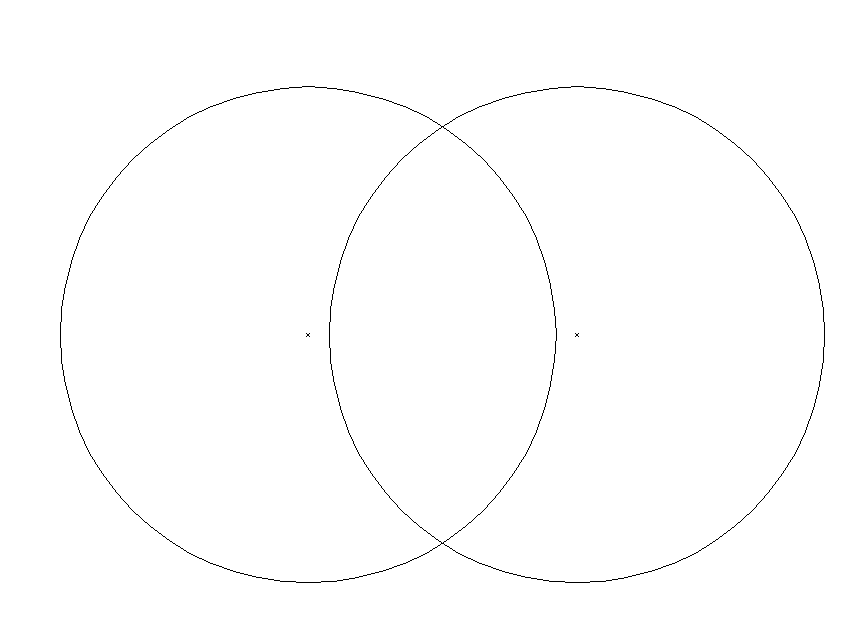
To see this in action, let’s examine a simple Illustrator document. When the circles are rendered without any effects, you get a file that is 16 KB (non-optimized.)
When you add transparency, a blur, and a multiply between layers the file size doubles. The culprit is the circle on the right—it is now a bitmap.

Of course, it’s entirely possible to create an icon without any effects. It’s even possible to do some very creative things with simple vectors. But it won’t fly with a client who’s intent on winning an ADA.
To them, it will look like it crawled out of a Postscript printer in 1990.

So where does that leave us? With a realization that, in practice, “vector” PDF files are no longer resolution independent.

All of this is just a long winded way of explaining Apple’s recommendation in the Resolution Independence Overview (pg. 23):

Vector-based art is automatically scalable, so you should use vector-based images for simple artwork; such as black-and-white images or flat images without dimensional detail (such as shadows or gradients).

In summary, our original advice remains. If you’re a designer, create with vectors to future-proof your work. If you’re a developer, bitmaps provide the best combination of size, speed and appearance. And if you decide not to take our advice, we promise not to hold it against you. :-)

Announcing IconBuilder 8.1

November 16, 2006

By Webmaster

Preview

The Iconfactory is pleased to offer a significant upgrade to IconBuilder, our powerful and flexible icon construction filter for Photoshop and Fireworks. Version 8.1 adds full support for building Windows Vista icons including updated grid files and Photoshop actions. It also includes support for larger icon sizes in Mac OS X, multiple resolution TIFF files and a host of other updates and bug fixes. This upgrade is free for all registered Iconbuilder 8 users. Please visit the IconBuilder homepage for more information.

Squeek squeek, squeek squeeken!

November 14, 2006

By Webmaster

Just because the days are growing short and the temperature is starting to drop, it doesn’t mean you can’t bring a bit of warmth and sunshine into your world. Mindy is pleased to announce the release of her latest freeware desktop picture – Happy Squirrel. This fun, bright desktop picture will put a smile on your face and acorns in your pouch until winter is over. So swing on by and grab it from the desktop pictures page today!

Resolution Independence for Developers

November 13, 2006

By Webmaster

Preview

Over the past few days, a discussion about resolution independence in Mac OS X has started on some of the developer blogs we follow. The whole thing started with Resolution Independent Fever by Daniel Jalkut. Sven-S. Porst followed up with a more user centric view of the situation.

Although we’ve touched on some of the design and workflow issues required with larger icons, we haven’t offered any advice targeted at developers. For our readers who don’t know an NSImage from a DPI, we suggest that you go get some nice icons, because the rest of this message will get technical :-)

In many development tasks, the first solution you come up with isn’t necessarily the best one for the final product. When we first encountered resolution independence, it seemed like vectors were the way to go. You only have one file and it can be used on the desktop, in a UI or for promotional materials.

But as you begin to use vectors, you realize that there are some inherent problems with size, speed and appearance:

Size: Today’s photorealistic icons require a lot of vectors. More than you may realize. Unless you’re dealing with simple line art, effects such as gradients, shadows, and highlights result in enormous files. As an example, compare this 512×512 pixel PNG file of the CandyBar icon with a PDF file containing the same image. The PNG file is about 100 KB while its PDF counterpart is a whopping 3 MB. Consider a five icon toolbar with PNG files versus a toolbar with PDF files—500 KB versus 15 MB. Your ISP will love you and your PDF icons!

Speed: As developers we love to deal with abstractions—unfortunately, concrete reality often gets in the way. Vectors present a nice conceptual image model which fails when you consider today’s graphics hardware. Simply put, a GPU can’t deal efficiently with vectors. Processing of raster images can be sped up significantly by performing tasks in parallel—no such speedup is obtained with vectors. Try opening both of the sample images above in Preview. You can zoom in and out to get a feel of the performance characteristics of vector versus raster data.

Appearance: Like all Mac developers, we’re concerned about our application’s appearance. Scaling vectors that are optimized for presentation at a large size will result in images that look unacceptable at small sizes. The trained eye of a designer knows which pixels to keep and which ones to throw away—automated scaling of an image does not.

As you begin thinking about resolution independence for your application, keep these things in mind. A basic rule-of-thumb would be to use vectors if you can imagine the paths used to create the image. Daniel’s pie chart graphic would definitely fall into this category. If your brain can’t handle the complexity of an icon like the one for CandyBar, it’s unlikely that your Mac will be able to either.

If your graphic designer is following our previous advice for designing multi-resolution graphics, it will be a simple task for them to create the images you need with a tool like IconBuilder.