As autumn barrels on towards winter, we’re starting to bundle up tighter here at the Factory as we feel the breeze get chillier. But the leaves are still changing, and fall hasn’t quite ended yet, so we’re celebrating the last weeks of the season with Autumn Leaves, a new desktop wallpaper from Mindy! The wallpaper is available in sizes that will fit your iPhone, iPad and Mac, and will go along perfectly with your Thanksgiving festivities. Head on over to the freeware page to grab it today!
The Breakroom
Falling Leaves and a Chill Breeze
November 27, 2013
Announcing the All-New AppViz
November 19, 2013

We’re pleased to announce the launch of AppViz 3, the most powerful, elegant way for developers and publishers to track product success in the App Store. IdeaSwarm and the Iconfactory have partnered to re-think the way sales, revenue and trends are viewed in a way that will empower and delight.
The entire interface has been re-designed to make day-to-day use more immediate and friendly. On launch, a new Dashboard gives quick insights into top earners. A new take on the Stats screen gives a bird’s eye view of how iOS, Mac or iBook products are performing, with results presented in easy-to-understand charts and graphs.
Want the nitty-gritty details about how your products are doing? No problem: the new Details screen lets you drill down to view long-term trends, sales, upgrades and more. The data presentation is easy to customize and quickly organize into collections. There are also tools to monitor in-app purchases, see reviews worldwide, and keep tabs on competing products.
The new Finances section takes AppViz to the next level. Quickly see App Store earnings and reconcile them with bank statements, making it easy to spot problems with deposits, get accurate month-to-month earnings reports, and track royalty payments to partners. With AppViz you will always know exactly how much you’ve earned in the App Store.
One of the most amazing new features is under the covers: an all-new data storage and delivery system designed for speed and security. Once you sign up for a free AppViz.com account and link it to iTunes Connect, your data will be collected automatically and stored securely with industry-standard encryption. When you launch the app on your Mac, sales, rankings and reviews are ready in just seconds.
Track your first app completely FREE by signing up for an AppViz.com account. Subscription pricing starts at only $10/month to track up to 20 apps. Pay for a year in advance and save up to $60. Previous AppViz customers who sign up before the end of the year will receive a 30% discount for the first six months.
There’s never been a better time to create products for the App Store and keeping track of your sales with AppViz has never been easier. We invite you browse the complete list of features, get answers to frequently asked questions and download AppViz to begin your free trial. Let’s get started!
T-Shirts Are Going Away. Get Them NOW!
November 15, 2013
The Iconfactory’s online store for purchasing hard goods is closing up shop at the end of this year and we’re holding a sale to celebrate. You can now purchase Iconfactory t-shirts for the super-low price of just $9 and Ollie vinyl figures at 40% off the normal price.
If you’ve ever considered picking some shirts or figures up but decided to wait, now’s the time. Once the shop closes you’ll never be able to buy these items from us again. It’s honestly now or never folks. They make great holiday gifts too so stop reading and head over to our store and grab these items while you still can. Thanks!
Is she scary beyond all reason? Yeah, that’s her.
October 29, 2013
It’s almost the end of the month, and we’ve saved the scariest of our All Hallow’s Eve treats for last! From Mindy, we have Yzma, a wallpaper that’s… well, how would you describe it? Scary beyond all reason? Yeah! That’s it. Also from Mindy, we have Toxic, a wallpaper depicting the dangers that human children present to all monsterkind. Be careful out there, scarers! These wallpapers are sized perfectly for your iPhone, iPad and Mac, so finish off the month in spooky style by grabbing them on our Freeware page!
It’s New Freeware, Charlie Brown!
October 23, 2013
This week’s freeware takes the form of three new desktop wallpapers perfect for the Halloween season. Mindy brings us two offerings in the form of Pig Pen and Pumpkin Patch, wallpapers featuring iconic characters and settings from the classic, ‘It’s the Great Pumpkin, Charlie Brown.’ In addition to these, Dave Brasgalla invites the undead hordes to shamble across your desktop in Heartland. All of these wallpapers are available in sizes perfect for your iPhone, iPad and Mac, so head on over to the freeware page to grab them today!
iOS 7 and the Iconography of ‘Alien’
October 17, 2013
 In the early days of home computers with graphical user interfaces, icons were simply black and white, constrained within a 32×32 or 16×16 pixel square. Pioneer designer Susan Kare created icons for the Macintosh and Windows that were masterpieces of visual communication, and yet also somehow imbued with their own charm. These early icons set the standard for well over a decade, and continue to be relevant today. As the colour palette grew from 256 colours to millions, and alpha channels gave us even more flexibility, detail and surface effects began to overtake the clarity born of those original design constraints.
When OS X and Aqua arrived along with the new millennium, icon design eventually shifted into full-fledged illustration. Growing ever larger in size, icons had transformed into elaborate depictions of three-dimensional objects, often stunning in their polish and detail – and a single icon could now perhaps take weeks to complete. As mobile phone interfaces increased in sophistication, the trend spilled over to those devices as their makers strove to offer the same richness of graphical experience.
All of this changed when Apple revealed iOS 7 – a serious shift in design intent that shocked many users, designers and developers. Gone are the elaborate surface treatments and 3D effects. In their place, we find a carefully pared-down palette and design construction method. The simplicity and lack of ornament combined with the bold colour schemes struck many as almost child-like – which is understandable given the levels of detail and gloss that we’ve come to expect over the last decade.
For my part, I have a very positive feeling towards iOS 7, for one main reason: it brings computer iconography firmly back around to concentrating on communication rather than illustration – function over form. This is the realm of the graphic designer, where informed decisions about composition and colour create successful, strong symbology that will outlast trends, and is applicable over multiple uses.
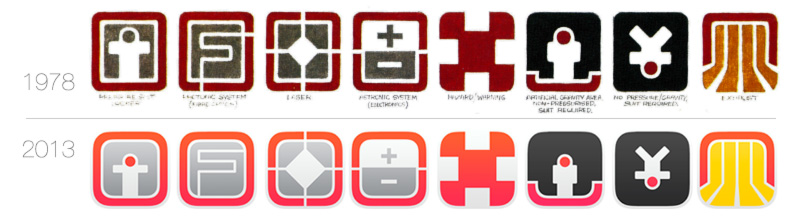
So, where exactly does Alien come into all this? I’ll explain: when I first saw the iOS 7 designs, it immediately put me in mind of a system of symbols developed by artist Ron Cobb for the 1979 film Alien. Amongst the many designs and concepts Cobb contributed to the film, we find a set of icons intended for use as industrial signage onboard the film’s space-going tug “Nostromo”. The “Nostromo” spaceship sets constructed for the film are famed for their immersive and thoughtful design, and were characterized by an absolutely amazing attention to detail. Cobb’s “Semiotic Standard” iconography is visible throughout the film, a subtle touch of world-building that bolsters the perceived reality of the setting.
 Quite a few Cobb icons are visible as part of the airlock set in this scene from the 1979 film. How many can you find?
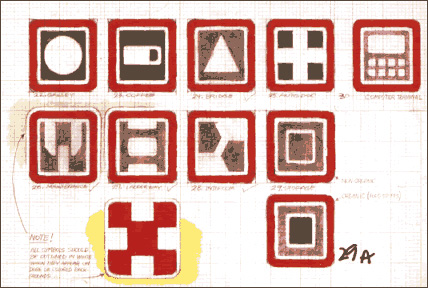
The symbols themselves are wonderful examples of simple, strong icon design – Cobb’s innate feel for logical, sensible design shows in everything he turns his hand to, from giant spacecraft and their control decks down to beer cans and clothing labels*. The icons are clean and direct, colour-coded and adhering to a grid-based construction method. They are essentially the same design intent as Apple’s iOS 7 system iconography. Here are some of Ron Cobb’s original sketches for the icon designs (from the book “Colorvision”):
Several people have vectorised these designs in the past, but I became interested in the idea of trying to fits Cobb’s Standard to the iOS 7 construction grid and colour palette. I was curious to see how much or how little effort would be needed to adapt them. Not surprisingly, things went rather smoothly.
Aside from a few adjustments in proportion, the icons adapted quite readily to the new grid. I made use of Apple’s so-called “super ellipse” in several places. I made one major change, which was to slim the glyph inside the “Maintenance” icon, as well as losing the two diagonals involved. I don’t necessarily think it’s “better” this way, but it felt like the right treatment within the terms of the experiment – apologies to Mr. Cobb.
The iOS 7 versions of the symbols keep both their strength and their characteristic flavour. It makes me smile to think that 35-year-old designs can suddenly feel current and even trendy again. It’s tempting to say that Cobb was ahead of his time with his Semiotic Standard, but I think the larger point here is simply that good design is timeless.
(*it could be argued that this actually worked against him when it came to designing the alien creature itself)
“An army of nightmares? Let’s get this party started.”
October 15, 2013

As we approach our favorite holiday, the time has come once again for us to rise from the dead and rearrange our pixels into something a little more appropriate for the season.
This month, as you gather supplies to fight off the zombie hordes and vampire covens, keep a lookout for our new insidious icon sets and diabolical desktop wallpapers. Be sure to visit our Dribbble page for some perilous previews of these Hallowe’en favors, and don’t forget to also check out our haunted staff page, where our employees have undergone their yearly transformation into denizens of the night.
Today we’re releasing three new desktop wallpapers to start off our celebration of the supernatural and macabre. Kate England’s Halloween Glow is full of festive colors for the fall season, and Mindy Weaver brings us Kou and Moka, featuring characters from the popular anime series, Rosario+Vampire. All three of these offerings are available in sizes perfect for adorning your Mac, iPad or iPhone. Head on over to the freeware page to get into the holiday spirit today!
Our mad scientists are hard at work, cranking out more tricks and treats to keep the season festive, so keep checking back with us to see our latest spooky, scary additions. In the meantime, enjoy a few creatures from our past, and have a Happy Halloween!
Twitterrific 5.5.2 Adds Twitter Profile Editing
October 14, 2013
Twitterrific 5.5.2 is now available in the App Store and brings with it support for editing user profiles.
The new profile editing view (accessed from your user profile or by tapping and holding on your avatar in the timeline) allows you to change your name, location, website, and bio information on the fly. You’ll also be able to pick new avatar and banner images and crop them to your liking from within the application. The view displays your avatar and banner overtop one another, so you can easily tell how the final changes will look in your profile and on Twitter’s website.
Other notable improvements in 5.5.2 include:
- Performance enhancements when scrolling and loading the timeline
- Improved application launch time
- Bug fixes and more
Twitterrific 5 has been hailed by critics and users alike as one of the most beautiful and fun to use applications in the App Store. The app is currently on sale directly from the App Store for just $2.99. Existing users can update to version 5.5.2 via the App Store’s software update. Enjoy!
SuperStacked Mac Bundle featuring xScope
October 10, 2013
We’re pleased to announce that xScope is participating in the newly released SuperStacked Mac Bundle. Along with xScope, the bundle offers access to 23 additional useful development tools and resources at a highly discounted price.
xScope is our Mac utility, featuring eight tools in one that combine to help you measure, inspect, and test your work. It’s a UI Swiss Army Knife that no designer or developer should be without. Check out xScope 3’s new features and user guide to find out more about how it can help you improve your daily work flow.
Starting at $35, the bundle’s price will be increasing by $1 a day, so we urge you not to wait to grab the SuperStacked Mac Bundle today.