Now through August 31st, we’re offering a 30% discount on two of our most popular productivity tools – Tot for note takers and xScope for designers and developers.
Saving a bit of cash is always welcome, even if you’re not a student, so be sure to head to the App Store to pick up Tot Pocket at a reduced price or use the promo code BACKTOSCHOOL when you purchase xScope from our website. Don’t wait, this sale will be over before you know it!
Those industrious bots are back with an update to our fast-paced puzzler, Frenzic: Overtime. Whizbot’s Test Lab Daily Challenge has received an upgrade to include all new exciting bonuses and strategies as you compete to be the top bot world wide. The Test Lab now also makes it easier to see the players immediately above and below your current rank on the leaderboard, and the bonus meter is personalized by displaying your player avatar from Game Center.
Finally, for those who want to kick back and build power cores at a bit more of a leisurely pace, Frenzic now offers the ability to toggle between Quick Pace and Casual Pace via Settings. Casual Pace means slower chip and shift timers as well as a less aggressive Cipher on Hacker Levels. Just don’t tell BossBot!
Head on over to Apple Arcade and enjoy the latest update to Frenzic: Overtime today!
Tot, our tiny text companion, makes a lot of folks happy. But with any product, there are always requests for new features. In version 1.4, we’re happy to announce that we tackled our top two requests!
Smart Bullets
A lot of folks, including your humble developers, use Tot for lists. It’s a quick, easy, and unstructured way to keep track of things that need attention. So it makes sense to have a way to check things off in those lists, right?
Prior to today’s release, that wasn’t easy.
And all the solutions we looked at weren’t easy either. Adding in-line checkmarks like Notes was a move away from Tot’s superpower: handling plain text. The size of tap areas on iOS was also an issue: text tends to be a lot smaller than your finger (one of the reasons folks want a magnifier when selecting text).
But after several tries, we finally found a way to do it, and we’re calling the result “Smart Bullets”. These bullets are plain text, but the thing that makes them smart is that you can click or tap to change their state. And when you add a new bullet, it always starts unchecked and stays that way until you change it.
On macOS, you can add a smart bullet using the ✻ button at the bottom of the window. On iOS, you can setup the bullets using Quick Keys in Settings.
Based on our own use over the past month, this is one of those “how did I ever live without this?” features.
iOS Widgets
Dots on your Home Screen? Finally.
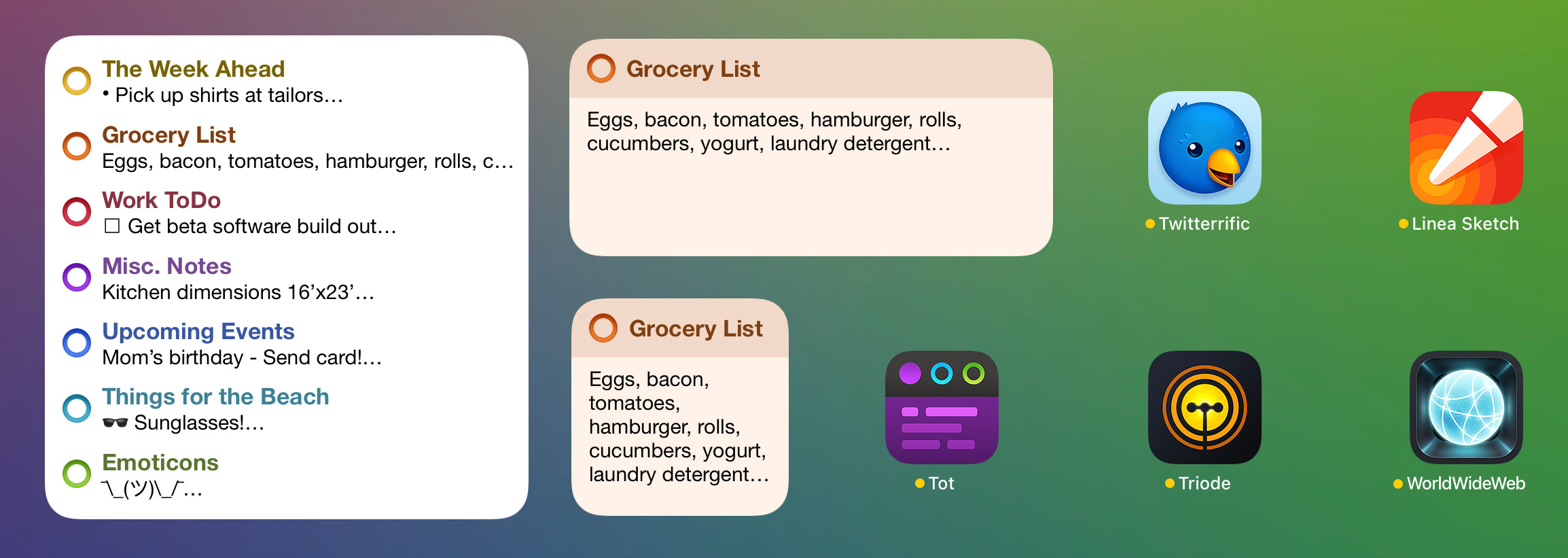
The widgets come in two flavors:
The Multi-dot layout shows a short summary for each dot.
The Single dot layout shows a single dot that you can configure by tapping and holding, then selecting Edit Widget.
Both layouts come in a variety of sizes to match your needs. The heading for the widget comes from your first line of text. The body comes from any subsequent lines.
With the release of support of Shortcuts in the last Tot release, you now have a place on your Home Screen that can be automated with text! One of our beta testers is using the Tot widget for a quote of the day, but you could use it to display system status, the number of days until Christmas, or whatever you can dream up!
(If you want to play around with the Quote of the Day shortcut, you can download it from iCloud. Be aware that it replaces the contents of one of your dots, so proceed with caution!)
And More…
There are bunch of other minor improvements like opening links directly in the app on iOS, improved pointer interactions on iPadOS, and a new Paste and Match Style on macOS. See the product website for a full list of changes.
WorldWideWeb, our FREE app for running a simple web server has struck a chord with developers and other folks who work with HTML, CSS, and JavaScript. Even the discerning individuals at Hacker News had nice things to say about it!
Today we’re happy to announce an update for both macOS and iOS.
The main improvement in version 1.0.1 is “auto refresh”. As you edit the text files in your Website Folder, the app watches for changes. When an update is detected, a web socket is used to send a notification to the browser that causes a refresh.
A small bit of JavaScript is injected into every HTML page to make this happen, and the feature can be disabled if that causes a problem.
It feels like freedom to work on a site in a text editor and see the browser update as soon as you press ⌘S. Flipping back and forth to refresh is a thing of the past!
The new version also supports drag & drop to get a site going. You can drag a folder onto the Dock icon or Website Folder section of the window.
For other changes, check out What’s New on the App Stores. Your FREE download for macOS and iOS await!
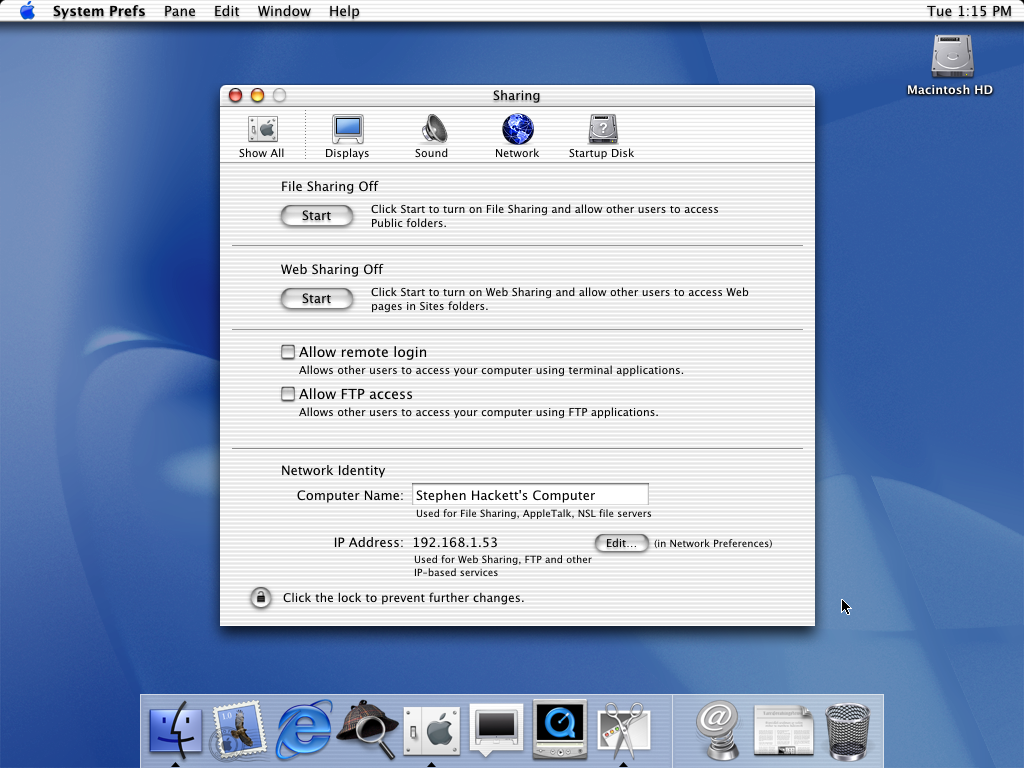
The Mac and Web have a long history together. From the very beginning, Mac OS X included the ability to run an Apache web server by clicking a Start button:
Sharing preferences in Mac OS X 10.0. Courtesy 512pixels.net
About a decade ago, things started to change. Since then it’s gotten harder and harder to start a simple web server for testing HTML, CSS, and JavaScript. I eventually found a way to do it using AppleScript, but as Apple continues to remove open source components from its standard macOS distribution, this workaround isn’t likely to last.
So I decided to write my own web server app. After a bit of research, I landed on the Swifter project for handling the socket connections and file transfers. While not as capable as a production quality server like Vapor, it was perfect for the simple and lightweight solution I had in mind.
The focus for this new app was to not be a production web server. These features are great for development and not something you’d want on a real server:
No caching — Every request gets a new response, no cache busters needed
Easy to configure — Pick a folder and go, recent folders let you switch sites instantly
Directory listings — A handy list of files whenever you hit a URL that doesn’t exist
Bonjour support — Automatic DNS for easy access using devices on your local network
REST friendly — Set default responses as JSON or XML for easy mocking of APIs
No dependencies — Completely standalone, no need for other tools like Python or Ruby
Simplified logging — Track requests & responses in Terminal with an easy-to-read format
Built-in security — Runs completely in a sandbox, no access to data unless you allow it
Powerful and lightweight — A small memory footprint with minimal CPU overhead
No rocket science — Perfect for people who are less technically inclined
Once I had all this running on macOS, I stumbled upon something unexpected. All of the Swift code I had written for macOS worked perfectly on iOS. With multi-tasking and a great text editor, iPadOS was suddenly a viable environment for standalone web development.
Bonjour is the glue that ties it all together. It’s effortless to start a server on your Mac and view your content on an iPhone or iPad. Or vice versa. It’s been the perfect tool for managing the video help library content in Linea Sketch: it lets Ged and me work together without a complex setup and ensures that things look great on all screens.
We only had one thing left to do: come up with a good name. During that search, we came across the first name. The thing that made the original WorldWideWeb so great was its ability to combine editing and serving of content into a single app. Our new WorldWideWeb continues that tradition: allowing a single device, like your iPad, to perform both tasks.
Actually, that’s a lie. We had two things left to do: the app also needed a kick-ass icon. It seemed fitting to reach back to the time of Aqua for this one: who better to do that than Dave Brasgalla?
The good news is that both apps are FREE on macOS, iPadOS, and iOS. It felt right to give something back to the web community that has give us so much over the years, so download the apps today and enjoy making great content no matter where you are!
Last week we paused to remember the life, art and legacy of Corey Marion, our beloved friend and Iconfactory founder who passed away on Sunday, May 22nd. Corey was a kind, talented and amazing person who touched the lives of all who knew him by his digital creations and generous deeds.
Today’s update brings a host of new features specifically designed to make Linea Sketch easier, quicker, and more flexible than ever before. With this new version, you can turn any drawing tool into a textured eraser, sketch inside strokes and canvas elements, organize projects into handy collections, and watch video tips and tricks in a new Video Help Library.
Less Really Is More
Linea Sketch 4.1 lets you turn any of the app’s drawing tools into a textured eraser. Select the Clear Ink swatch from the top of the color palette, then draw or paint with your tool of choice to “erase” areas of your sketch.
Clear Ink is great for blending areas of one layer into another, knocking back part of a layer into the background, and much more.
Always Draw Within the Lines
Linea’s new Transparency Masking is a great way to re-color existing parts of your drawing or sketch. Once activated from the Layers palette, transparent pixels are ignored, confining your drawing to only what’s visible on the current layer.
Add textured shading inside shapes with Linea’s pencils, flood fill entire shapes with new colors quickly and easily, or paint with Linea’s watercolor brush, all without having to worry about adding pigment where you don’t want it.
You can even use the blending tool in combination with Transparency Masking to create soft gradients and tonal transitions within existing strokes, doing away with the need to erase afterwards.
Stay Organized and Save Time
Linea now offers users a way to place projects and their associated sketches into handy collections that can be arranged and organized to fit your work. Collections let you group similar projects together for easy, quick access.
Use them to archive older work and get it out of view, keep work separate from play, or cross-reference sketches by assigning a single project to multiple collections.
You can also assign a custom thumbnail to a collection for quick reference. Collections sync to all devices via iCloud and are a great way to stay focused on what’s most important.
But That’s Not All
A new Video Help Library lets you watch tutorials, get in-depth walk throughs of Linea’s features, and enjoy time-lapse drawings. Topics include a wide range of frequently asked questions and include “how to” sessions to get the most out of the app. You’ll even get an in-app notification when new content is added.
You can even watch videos using iOS’s picture-in-picture feature to follow along while working in Linea!
We’ve also added the ability for Linea Link, our free companion app for macOS, to safeguard your work and automatically backup your sketches on launch. If you own a Mac, Link’s new auto-backup feature is invaluable.
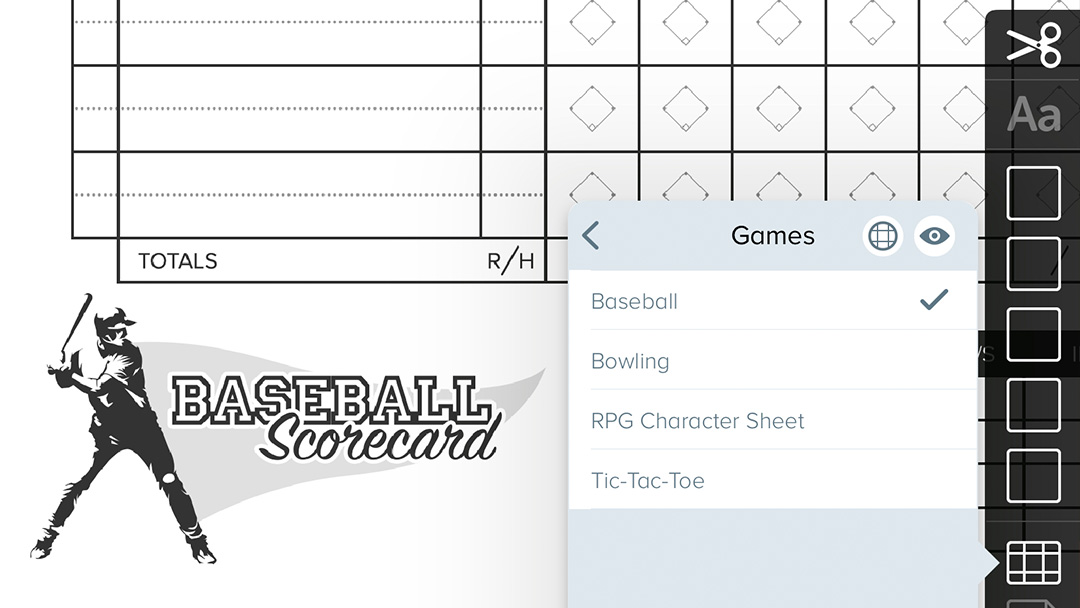
There are many more improvements, including a new Trash container in the Project view to safeguard your sketches, new Apple Pencil double-tap actions for use with Clear Ink, improved color handling, and even a fun, new selection of templates for playing games.
Today’s update is the perfect opportunity to see why so many people call Linea their favorite sketchpad. Visit Linea’s version history page for the complete list of what’s new, and then head on over to the App Store and grab the FREE download of Linea Sketch. It’s where your ideas begin!
When last we saw DoBot and his factory friends, they had just finished saving the world. Unfortunately for them (but fortunately for you) their work isn’t over yet. We’re proud to present Chapter Two of Frenzic: Overtime!
Chapter Two continues the adventures of DoBot, InfoBot, and WhizBot, as they’re pursued by a hit squad of HenchBots. This chapter adds over 30 new levels, new goals and achievements, along with some exciting new game mechanics.
Head on over to Apple Arcade to get Frenzic: Overtime and keep building those powercores!
If you’ve been following our work for awhile, the name CandyBar may ring a bell. It’s an app we worked on with Panic and released in 2002. Twenty years ago!
CandyBar did one thing and it did it well: every system icon on your Mac could be changed, including folders and disks, with the click of a button. It was a collaboration where Panic provided the code and we provided the content. People loved it then the same way they love widgets on iOS now: it gave your Mac a personality as unique as your own.
We also had another product around that time called Pixadex. It was a library app, much like Photos, that helped us keep track of all the icons we were making as freeware. It was also a joint effort with Panic.
In 2007, CandyBar 3 was released with the functionality of both products combined. It was a hit and folks were having a grand time customizing their Macs.
But all this sweetness slowly started to sour. The reason was simple: Apple started taking steps to lock down the security of Mac OS X. CandyBar worked by replacing icons in well-known locations, and when those places became inaccessible, things began to break. We did the best we could, but eventually pulled the plug in 2012. Ten years ago!
Mostly we were left with bittersweet memories. But there was one thing that CandyBar could still do very well: manage a large archive of icons. So we’ve been using it periodically for the past decade.
With the arrival of Big Sur and Monterey, a bunch of annoying bugs started to surface. Our long beloved tool was showing its age. Over the annual Christmas break, we dusted off code that hadn’t been touched for years, and squashed the most egregious bugs (there are still plenty of bugs). We also removed the features that let you change system icons. That ship has sailed and ain’t coming back.
The result is CandyBar – Sugar Free Edition™. Like the version released a decade ago, it’s still FREE. It’s also completely unsupported so there’s no technical assistance for the app whatsoever. After you download the app you’ll need to get past Gatekeeper (the code signing identity is one of those many bugs). Once you’re running, you’ll have a glimpse of what Pixadex looked like so long ago, but with support for the latest operating systems and Apple Silicon.
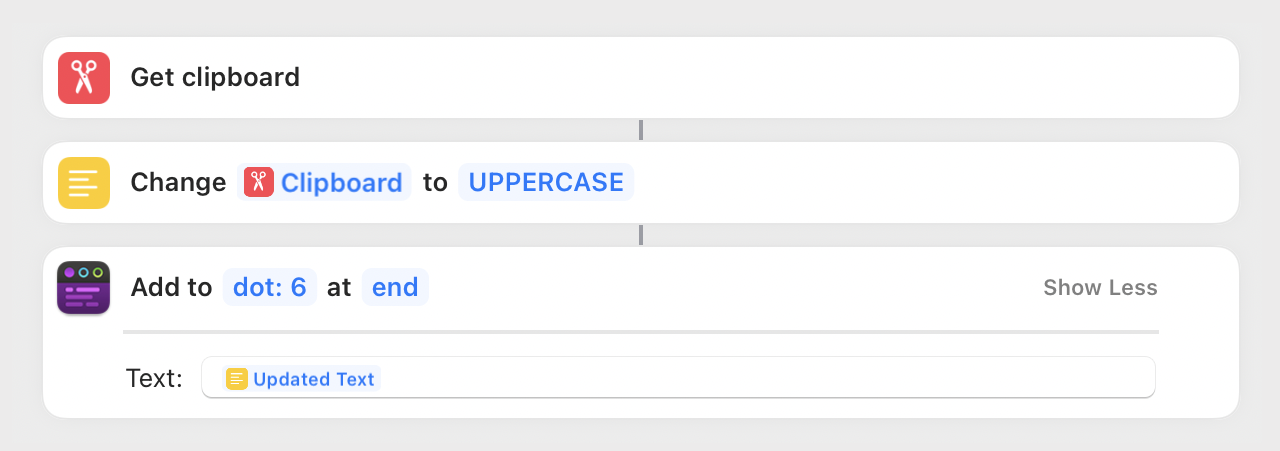
Our wildly popular app, that manages bits of text simply and efficiently, has been updated to version 1.3. The biggest news in this release of Tot is the addition of Shortcuts on macOS and iOS.
Tot’s shortcut actions are as simple as the app itself:
Get the text from any one of the dots
Set the text for any dot
Add text to the beginning or end of a dot
Query a dot for additional information, including line/word/character counts, a JSON representation, and more
You can also switch which dot is showing in the UI
Tot’s actions let the app be a convenient place to put the output from one of your shortcuts (when creating a file is overkill). It’s also a great way to collect and prepare text as input for a workflow. In short, Tot has become a scratchpad for automation. And because the actions are identical on macOS and iOS, your customizations work anywhere.
Mac power-users who love Command-Tab also get a great new feature: Smart Icons. When this new option is selected for “Control With” in Settings, you’ll get a menubar icon that opens the popover window as always. But now when you detach the popover, you’ll get a Dock icon as well. This lets Tot show up in the Command-Tab list and display menubar items. It’s the best of both worlds.